Unit4 Agresso training and in-app user manual for faster adoption.
Agresso ERP is powerful, but everyday workflows can feel complex. Inline Manual adds in-app guidance, walkthroughs, and searchable help so teams learn Unit4 Agresso while doing real work without extra classroom sessions.
✅ Supports 70+ languages · ✅ Contextual in-app help · ✅ Better Agresso training outcomes


 Watch a demo
See our product in action with Unit4 ERP™.

'%3e%3cpath%20style='fill-rule:evenodd;clip-rule:evenodd;fill:%23EB0A1E;'%20d='M33.8,24.1h26.6v26.6H33.8V24.1z'/%3e%3cpath%20style='fill-rule:evenodd;clip-rule:evenodd;'%20d='M123.3,38.2l1.5-3.9l1.5,3.9H123.3L123.3,38.2z%20M126.3,32.1h-3.1l-4.3,10.6h2.7l1-2.6h4.4l1,2.6h2.7%20L126.3,32.1z%20M104.4,40.8c-1.8,0-3.2-1.6-3.2-3.5c0-1.9,1.4-3.5,3.2-3.5c1.7,0,3.2,1.6,3.2,3.5C107.6,39.3,106.2,40.8,104.4,40.8%20M104.4,31.7c-3.1,0-5.6,2.5-5.6,5.6c0,3.1,2.5,5.6,5.6,5.6c3.1,0,5.6-2.5,5.6-5.6C110,34.2,107.5,31.7,104.4,31.7%20M82.3,40.8%20c-1.7,0-3.2-1.6-3.2-3.5c0-1.9,1.4-3.5,3.2-3.5c1.7,0,3.2,1.6,3.2,3.5C85.5,39.3,84,40.8,82.3,40.8%20M82.3,31.7%20c-3.1,0-5.6,2.5-5.6,5.6c0,3.1,2.5,5.6,5.6,5.6c3.1,0,5.6-2.5,5.6-5.6C87.9,34.2,85.4,31.7,82.3,31.7%20M96.2,32.1l-2.7,4.3l-2.8-4.3%20H88l4.3,6.7v4h2.4v-4l4.3-6.7L96.2,32.1L96.2,32.1z%20M119.4,32.1h-9.1v2h3.4v8.6h2.4v-8.6h3.3L119.4,32.1L119.4,32.1z%20M67.1,34.1%20h3.4v8.6h2.4v-8.6h3.3v-2h-9.1L67.1,34.1z'/%3e%3cpath%20style='fill-rule:evenodd;clip-rule:evenodd;fill:%23FFFFFF;'%20d='M47.1,31.3c-5,0-8.9,2.6-8.9,6c0,3.3,3.7,6,8.9,6s8.9-2.7,8.9-6C56,33.9,52.2,31.3,47.1,31.3z%20M52.7,33.9%20c0.2,0.7-0.7,1.7-3.5,2c-0.2-1.9-0.7-3.5-1.7-3.8c1.3,0,2.4,0.2,3.5,0.6C52,33.1,52.6,33.5,52.7,33.9L52.7,33.9z%20M48.5,37.3%20c0,2.4-0.7,3.4-1.4,3.4c-0.7,0-1.4-1-1.4-3.4l0,0c0.4,0,0.9,0.1,1.4,0.1S48.1,37.4,48.5,37.3L48.5,37.3L48.5,37.3z%20M47.1,36%20c-0.5,0-0.9,0-1.3,0c0.2-1.6,0.8-2.5,1.3-2.5c0.5,0,1.1,0.9,1.3,2.5C48,36,47.6,36,47.1,36L47.1,36z%20M41.6,33.9%20c0.1-0.4,0.7-0.9,1.7-1.2c1-0.4,2.2-0.6,3.5-0.6c-0.9,0.3-1.5,1.9-1.7,3.8C42.3,35.6,41.4,34.7,41.6,33.9L41.6,33.9z%20M39.6,37.2%20c0-1,0.3-1.9,0.9-2.6c0.1,1.3,1.9,2.4,4.5,2.7l0,0.1c0,3.3,0.8,5,1.8,5.3C42.8,42.5,39.6,40.1,39.6,37.2L39.6,37.2z%20M47.5,42.7%20c0.9-0.4,1.8-2.2,1.8-5.3l0-0.1c2.6-0.4,4.4-1.4,4.5-2.7c0.6,0.7,0.9,1.6,0.9,2.6C54.7,40.1,51.5,42.5,47.5,42.7L47.5,42.7z'/%3e%3c/g%3e%3c/svg%3e)
%20--%3e%3csvg%20version='1.1'%20id='Symbols'%20xmlns='http://www.w3.org/2000/svg'%20xmlns:xlink='http://www.w3.org/1999/xlink'%20x='0px'%20y='0px'%20viewBox='0%200%2092%2034.9'%20width='90'%20height='34.9'%20style='enable-background:new%200%200%2092%2034.9;'%20xml:space='preserve'%3e%3cg%20id='Layer_1_1_'%3e%3clinearGradient%20id='SVGID_1_'%20gradientUnits='userSpaceOnUse'%20x1='59.967'%20y1='18.5419'%20x2='68.6025'%20y2='27.1774'%20gradientTransform='matrix(1%200%200%20-1%200%2036)'%3e%3cstop%20offset='0.3722'%20style='stop-color:%23006BFF'/%3e%3cstop%20offset='1'%20style='stop-color:%231B5ACF'/%3e%3c/linearGradient%3e%3cpath%20style='fill:url(%23SVGID_1_);'%20d='M66.8,14.1L71.4,7H67l-5.8,8.9c-0.5,0.7-0.9,1.5-1.2,2.3c-0.3,0.9-0.5,1.8-0.5,2.6L66.8,14.1z'/%3e%3cg%3e%3cpath%20fill='%23004797'%20d='M50.7,14.3h0.7c1.3,0,2.6-0.6,2.6-2.2c0-1.5-0.9-2-1.9-2c-1.4,0-1.8,1.3-1.9,1.9h-3.8%20c0.4-4.8,4.3-5.5,5.6-5.5c3.3,0,5.7,2.7,5.7,5.7c0,2.3-1.3,3.3-1.8,3.7c3.3,1.4,3.3,4.8,3.3,5.4c0,4.3-3.5,7-7.2,7%20c-3.5,0-6.8-2.5-7.1-6.7h3.8c0.2,2.2,2.1,3.2,3.4,3.2c1.6,0,3.3-1.3,3.3-3.4c0-1.7-1.1-3.5-4.2-3.5h-0.6V14.3z'/%3e%3c/g%3e%3clinearGradient%20id='SVGID_2_'%20gradientUnits='userSpaceOnUse'%20x1='59.4432'%20y1='18.5771'%20x2='91.5947'%20y2='18.5771'%20gradientTransform='matrix(1%200%200%20-1%200%2036)'%3e%3cstop%20offset='0'%20style='stop-color:%23006BFF'/%3e%3cstop%20offset='1'%20style='stop-color:%23004797'/%3e%3c/linearGradient%3e%3cpath%20style='fill:url(%23SVGID_2_);'%20d='M80.6,6.5c-4.3,0-8.1,2.5-9.9,6.2c1.3,0.6,2.4,1.4,3.2,2.4c0.9-2.9,3.6-5,6.7-5c3.9,0,7.1,3.3,7.1,7.3%20c0,3.9-3.1,7.2-7.1,7.2c-3.3,0-6-2.3-6.8-5.3c0-0.1,0-0.2-0.1-0.2c0-0.1,0-0.1,0-0.2c0,0,0,0,0,0c-0.8-2.7-3.1-5.1-7-5.1%20c-4.9,0-7.3,3.9-7.3,7.2s2.4,7.2,7.3,7.2c2.9,0,5-1.4,6.1-3.2c2,2,4.7,3.2,7.8,3.2c6,0,11-4.8,11-10.8C91.6,11.3,86.6,6.5,80.6,6.5%20z%20M66.7,24.5c-1.8,0-3.2-1.4-3.2-3.4s1.5-3.4,3.2-3.4c1.8,0,3.2,1.4,3.2,3.4S68.5,24.5,66.7,24.5z'/%3e%3clinearGradient%20id='SVGID_3_'%20gradientUnits='userSpaceOnUse'%20x1='59.4432'%20y1='18.5781'%20x2='91.5947'%20y2='18.5781'%20gradientTransform='matrix(1%200%200%20-1%200%2036)'%3e%3cstop%20offset='0'%20style='stop-color:%23004797'/%3e%3cstop%20offset='6.952000e-02'%20style='stop-color:%2300489B'/%3e%3cstop%20offset='0.1385'%20style='stop-color:%23004CA7'/%3e%3cstop%20offset='0.2072'%20style='stop-color:%230053BB'/%3e%3cstop%20offset='0.2758'%20style='stop-color:%23005DD7'/%3e%3cstop%20offset='0.3438'%20style='stop-color:%230069FA'/%3e%3cstop%20offset='0.3518'%20style='stop-color:%23006BFF'/%3e%3cstop%20offset='1'%20style='stop-color:%23006BFF'/%3e%3c/linearGradient%3e%3cpath%20style='fill:url(%23SVGID_3_);'%20d='M80.6,6.5c-4.3,0-8.1,2.5-9.9,6.2c1.3,0.6,2.4,1.4,3.2,2.4c0.9-2.9,3.6-5,6.7-5c3.9,0,7.1,3.3,7.1,7.3%20c0,3.9-3.1,7.2-7.1,7.2c-3.3,0-6-2.3-6.8-5.3c0-0.1,0-0.2-0.1-0.2c0-0.1,0-0.1,0-0.2c0,0,0,0,0,0c-0.8-2.7-3.1-5.1-7-5.1%20c-4.9,0-7.3,3.9-7.3,7.2s2.4,7.2,7.3,7.2c2.9,0,5-1.4,6.1-3.2c2,2,4.7,3.2,7.8,3.2c6,0,11-4.8,11-10.8C91.6,11.3,86.6,6.5,80.6,6.5%20z%20M66.7,24.5c-1.8,0-3.2-1.4-3.2-3.4s1.5-3.4,3.2-3.4c1.8,0,3.2,1.4,3.2,3.4S68.5,24.5,66.7,24.5z'/%3e%3cpath%20style='fill:%23003468;'%20d='M72.9,25.1c-0.2,0.4-0.4,0.7-1,1.2c0,0-0.7-0.7-1.3-2c-0.5-1.4-0.7-3.6-0.7-3.6C70.8,22.6,71.8,24.2,72.9,25.1%20z'/%3e%3cg%3e%3cpath%20fill='%23004797'%20d='M0.4,23.2L4,21.1c0.7,1.9,2.2,3.2,4.8,3.2c2.5,0,3.4-1,3.4-2.2c0-1.6-1.4-2.2-4.5-3.1%20c-3.2-0.9-6.3-2.3-6.3-6.3c0-4,3.3-6.2,6.9-6.2c3.4,0,6.1,1.8,7.5,4.7l-3.5,2c-0.7-1.6-1.9-2.7-4-2.7c-1.7,0-2.8,0.9-2.8,2.1%20c0,1.3,0.8,2,4,2.9c3.3,1,6.9,2.2,6.9,6.4c0,3.9-3.1,6.3-7.6,6.3C4.4,28.3,1.6,26.3,0.4,23.2z'/%3e%3cpath%20fill='%23004797'%20d='M30.6,24.1h-8.4l-1.3,3.8h-4.5l7.3-21h5.1l7.4,21h-4.5L30.6,24.1z%20M29.3,20.3l-2.9-8.6l-2.9,8.6H29.3z'/%3e%3c/g%3e%3cg%3e%3cpath%20fill='%23004797'%20d='M38.1,12.6v15.3h4.1V10.1C40.5,10.6,39.1,11.5,38.1,12.6z'/%3e%3cpath%20style='fill:%230081FF;'%20d='M42.2,8.8V6.9h-4.1v4.6v0.3C39.1,10.7,40.4,9.6,42.2,8.8z'/%3e%3c/g%3e%3c/g%3e%3c/svg%3e)
Why Unit4 Agresso users struggle (and why traditional training fails)
Many teams describe Agresso Unit4 as powerful but not intuitive in everyday workflows. Traditional Unit4 ERP training and static manuals rarely help at the exact moment users get stuck.
- Complex navigation and terminology that can feel non-intuitive.
- Extra steps to find the right report, enquiry, or data view.
- Heavy processes across approvals, procurement, and project billing.
- Performance that can feel slow in certain workflows.
- No built-in tutorials for complex Smart Client features.
What is Agresso software in Unit4 ERP?
Agresso (also searched as Agresso Unit4, Unit 4 Agresso, or Unit4Agresso) is the ERP platform many organisations use for finance, procurement, projects, HR, and self-service workflows.
Agresso system learning challenge
The Agresso ERP system supports many modules and roles, so users often need contextual help to complete tasks without delays.
Agresso training that works in real workflows
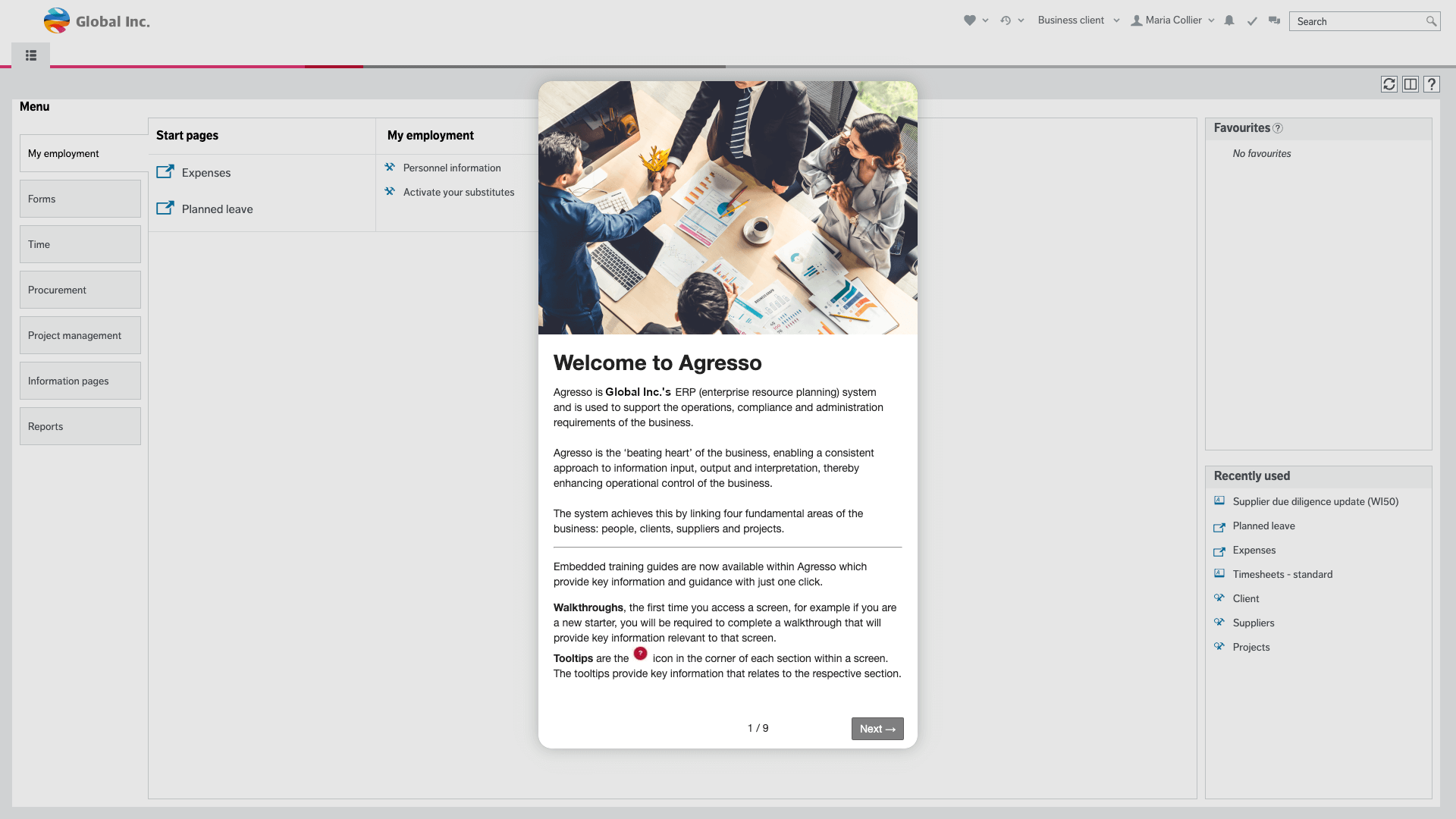
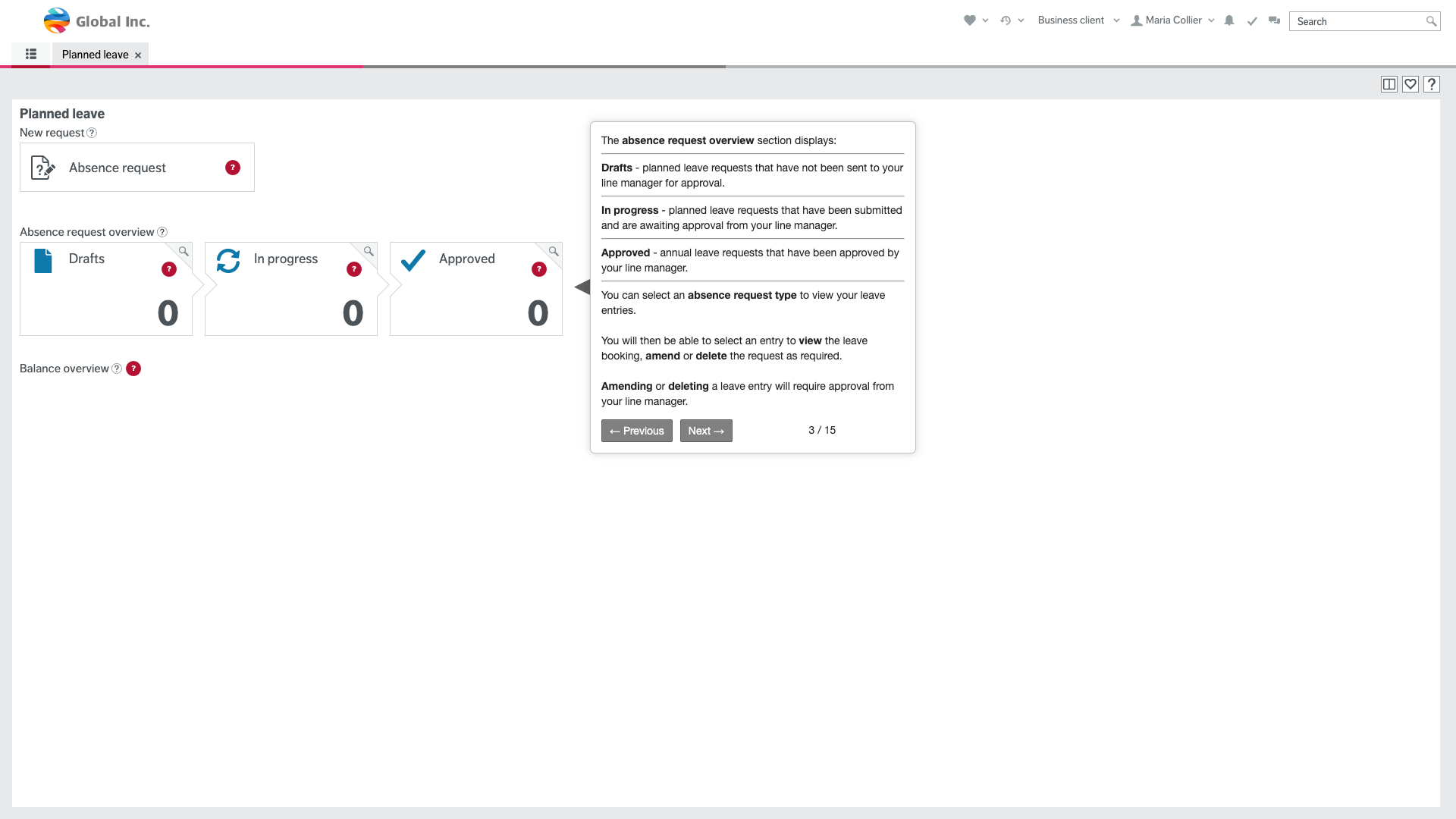
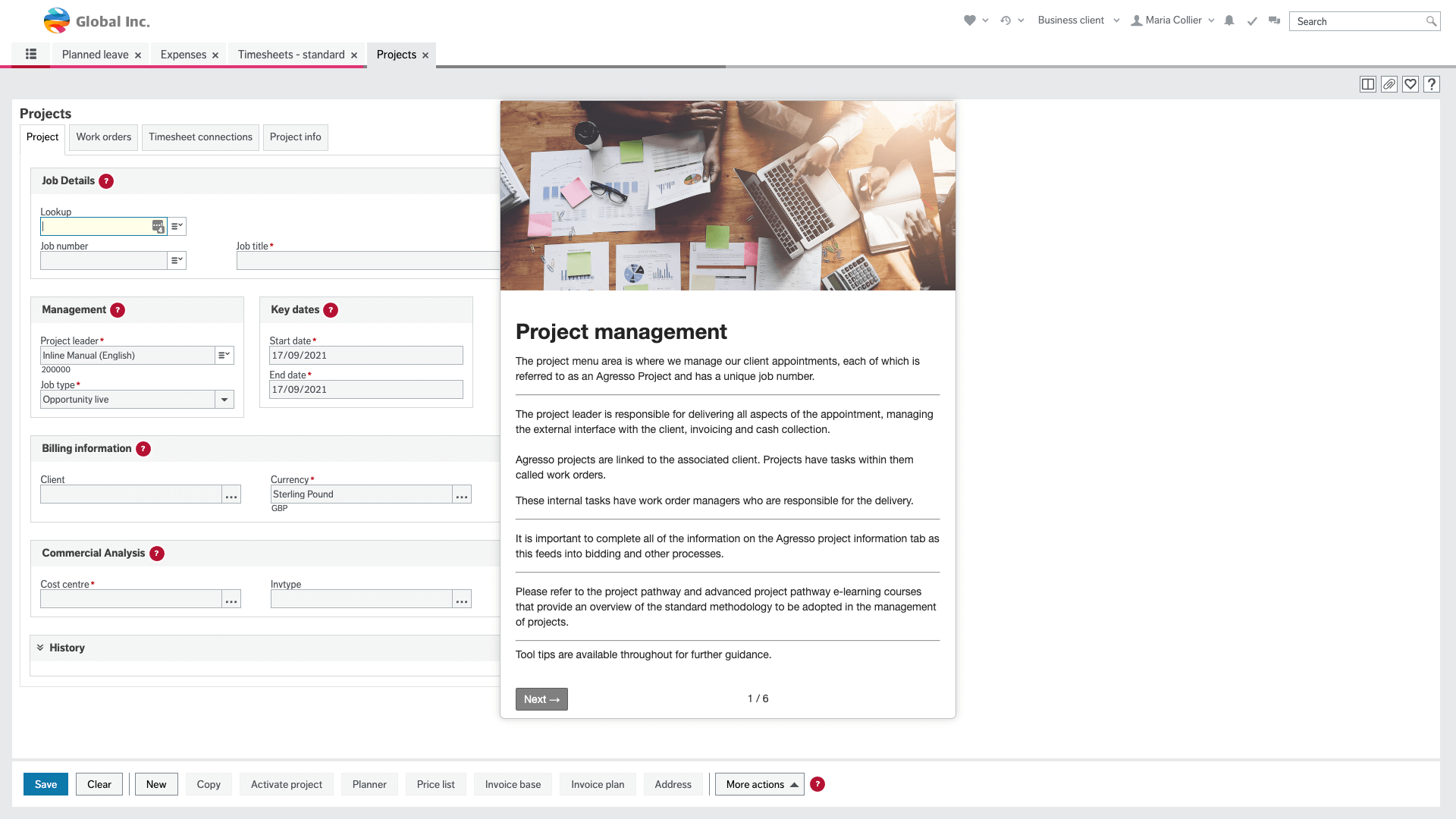
Instead of one-off classroom sessions, in-app walkthroughs and tooltips provide ongoing Agresso tutorial support exactly where users are working.
In-app guidance for Unit4 Agresso tasks that generate the most tickets
Target high-friction tasks with contextual help shown exactly where users need it. Many teams start with timesheets and expenses first, then scale guidance across additional modules once adoption improves.
Timesheets & expenses
Always-on hints and validation to reduce submission errors and rework.
Approvals & workflow
Walkthroughs for managers and occasional users who approve infrequently.
Procurement & invoices
Tooltips on fields, coding, and matching steps to prevent common mistakes.
Reporting / enquiries
Step-by-step guides to help users find the right report without raising tickets.
Smart Client
Context help for advanced workflows where built-in tutorials are missing.
This approach works well for growing organisations with distributed teams: guidance stays consistent globally while allowing for regional process differences, language needs, and role-specific workflows.
Guide users through problematic parts of the software
Employees are often struggling with the same parts of the Unit4™ all over again, whether its occasional users entering timesheets or new users setting up Project Billing for the first time. The helpdesk is flooded by the same tickets on a regular basis. Let them figure it out with in-app help and timely tooltips.

Walkthroughs
Once you identify where the users are struggling, let them learn the process properly with interactive walkthroughs.

Tooltips
Avail persistent help in places where employees are struggling the most. They will always have help available.
Analyse the impact and reallocate internal resources
Keep evaluating the performance of the content to understand where the users still need help. Check that users are understanding the data entry tasks and where they may be having difficulty or challenges and rectify with new help features. Adapt the support as new versions and modules are rolled out.

Analytics
Get insights on the overall performance of the education content you have created and keep closing loopholes. Monitor daily and occasional users and tailor support accordingly.
People tracking
Track the progress of specific users in order to understand where the problems are and identify how to fix them. Tailored training for customers and contractors on Unit4™ modules they use. Track if different language versions require additional support or changes in walkthroughs or tooltips.

Multilingual
Serve users content in a language they will understand and want to work with.
'%3e%3cg%20id='Group_671'%20data-name='Group%20671'%20transform='translate(0%20291)'%3e%3cg%20transform='matrix(1,%200,%200,%201,%20413,%202587)'%20filter='url(%23Rectangle_685)'%3e%3crect%20id='Rectangle_685-2'%20data-name='Rectangle%20685'%20width='88'%20height='61.333'%20rx='5'%20transform='translate(9%209)'%20fill='%23fff'/%3e%3c/g%3e%3cg%20id='Group_652'%20data-name='Group%20652'%20transform='translate(497.333%202602)'%3e%3cline%20id='Line_101'%20data-name='Line%20101'%20x2='6.667'%20y2='6.667'%20transform='translate(0)'%20fill='none'%20stroke='%23cad6e5'%20stroke-width='1'/%3e%3cline%20id='Line_102'%20data-name='Line%20102'%20y1='6.667'%20x2='6.667'%20transform='translate(0)'%20fill='none'%20stroke='%23cad6e5'%20stroke-width='1'/%3e%3c/g%3e%3c/g%3e%3cg%20id='Group_657'%20data-name='Group%20657'%20transform='translate(23%2047)'%3e%3cg%20id='Group_583'%20data-name='Group%20583'%20transform='translate(419%202855)'%3e%3ccircle%20id='Ellipse_25'%20data-name='Ellipse%2025'%20cx='16'%20cy='16'%20r='16'%20fill='%23cde1fa'/%3e%3cg%20id='Group_534'%20data-name='Group%20534'%20transform='translate(11.462%2020.052)'%20style='mix-blend-mode:%20multiply;isolation:%20isolate'%3e%3cg%20id='Group_478'%20data-name='Group%20478'%3e%3cpath%20id='Path_583'%20data-name='Path%20583'%20d='M0-2.05A12.887,12.887,0,0,1,4.89-3.228,13.537,13.537,0,0,1,9.859-2.05'%20transform='translate(0%203.228)'%20fill='none'%20stroke='%23000'%20stroke-linecap='round'%20stroke-width='2'/%3e%3c/g%3e%3c/g%3e%3cg%20id='Group_472'%20data-name='Group%20472'%20transform='translate(9.176%2012)'%20style='mix-blend-mode:%20multiply;isolation:%20isolate'%3e%3ccircle%20id='Ellipse_23'%20data-name='Ellipse%2023'%20cx='2'%20cy='2'%20r='2'%20transform='translate(-0.176%200)'/%3e%3cellipse%20id='Ellipse_24'%20data-name='Ellipse%2024'%20cx='1.5'%20cy='2'%20rx='1.5'%20ry='2'%20transform='translate(10.824%200)'/%3e%3c/g%3e%3c/g%3e%3cg%20id='Group_581'%20data-name='Group%20581'%20transform='translate(435.235%202855)'%3e%3ccircle%20id='Ellipse_22'%20data-name='Ellipse%2022'%20cx='16'%20cy='16'%20r='16'%20transform='translate(-0.235)'%20fill='%23ffe450'/%3e%3cg%20id='Group_536'%20data-name='Group%20536'%20transform='translate(9.176%2012)'%3e%3ccircle%20id='Ellipse_23-2'%20data-name='Ellipse%2023'%20cx='2'%20cy='2'%20r='2'%20transform='translate(-0.412)'/%3e%3ccircle%20id='Ellipse_24-2'%20data-name='Ellipse%2024'%20cx='2'%20cy='2'%20r='2'%20transform='translate(9.588)'/%3e%3c/g%3e%3cpath%20id='Path_581'%20data-name='Path%20581'%20d='M0,0S2.45,2.715,5.552,2.6c3.042.1,5.219-2.6,5.219-2.6'%20transform='translate(10.401%2020.848)'%20fill='none'%20stroke='%23000'%20stroke-linecap='round'%20stroke-width='2'/%3e%3c/g%3e%3c/g%3e%3c/g%3e%3c/svg%3e)
Feedback
Find out how you’re doing, identify the bottlenecks of your application by asking your users directly.

In-App help
Support your users by having a knowledge base available directly within the application.
Replace your Unit 4 Agresso user manual PDF with in-app guidance
Many teams search for a Unit 4 Agresso user manual PDF free download or a Unit 4 ERP manual, but static files quickly go out of date. Inline Manual brings your Agresso documentation directly into the workflow where work happens.
Connect existing knowledge content
Reuse your current articles and internal guidance instead of starting from scratch, including legacy quick cards and training notes.
Show help by page and field context
Surface the right tooltip, article, or walkthrough based on where users are working.
Keep support aligned with module changes
Update guidance quickly as Unit4 modules, workflows, and policies evolve, so teams do not fall behind after major releases.
Measure impact with analytics
Track help usage, completion, and ticket deflection to prove business outcomes.
Instead of rewriting static documentation for every change, teams maintain guidance once and deliver it in context to new hires, occasional users, and contractors across time zones.
Unit4 Agresso ERP training FAQ
Why is Agresso ERP hard to learn?
Unit4 Agresso ERP covers many modules and role-based workflows, so navigation and terminology can feel complex for occasional users. In-app guidance reduces learning friction by showing users what to do in the exact workflow they are in.
What is the best way to run Agresso training for occasional users?
Use short contextual walkthroughs and persistent tooltips in key tasks like timesheets, expenses, and approvals. Start with the highest-volume tasks first, then expand to other modules. This gives users on-demand support and improves Unit4 ERP training without more classroom sessions.
How can we reduce Unit4 support tickets without more classroom training?
Place guided help where repetitive tickets happen, then use analytics to identify gaps and improve content continuously. Teams typically reduce avoidable support demand by enabling self-service in the flow of work.
Where can I find a Unit 4 Agresso user manual PDF free download?
Most PDF manuals become outdated quickly as workflows change. Instead of relying on a static Unit 4 Agresso user manual PDF, publish a live in-app manual with contextual help, searchable knowledge content, and multilingual support directly in Unit4 pages and forms.
How do we support Smart Client workflows with on-demand guidance?
Map your high-value Smart Client journeys, add targeted walkthroughs and tooltips, and monitor completion with analytics. This helps users complete advanced tasks without waiting for specialist support.
What is Agresso used for?
Agresso software is commonly used for finance, procurement, project accounting, expenses, approvals, and HR-related self-service workflows inside Unit4 ERP.
Where do users find Unit4 Agresso login and self service help?
Users typically start at their organisation's Unit4 Agresso login or Unit 4 ERP login page. In-app help can then guide Agresso self service tasks like timesheets, expenses, and approvals after sign-in.
Do we need a Unit4 ERP manual, user guide, or modules PDF free download?
A static Unit 4 ERP user guide, Unit4 user guide, or modules PDF can help with reference, but in-app guidance is easier to maintain and use in daily work. Keep a live Agresso manual in context and update it continuously.
How to use Agresso for new users and implementation phases?
During Unit4 ERP implementation, start with a role-based Agresso tutorial for the highest volume tasks, then expand guidance by module. This improves adoption for employees and occasional users from day one.
Is Aggresso the same as Agresso?
Yes. “Aggresso” is a common misspelling of Agresso. Both usually refer to the same Unit4 ERP platform and related training or support content.
How do we improve Agresso support without increasing ticket volume?
Use in-app help, contextual messaging, and analytics to answer common questions before they become support tickets. This gives teams scalable Agresso support across regions.
'%3e%3crect%20id='Rectangle_203'%20data-name='Rectangle%20203'%20width='60'%20height='60'%20transform='translate(225%204486)'%20fill='%23fff'/%3e%3cg%20id='icon-productivity'%20transform='translate(236%204497)'%3e%3cg%20id='Group_711'%20data-name='Group%20711'%3e%3cpath%20id='Path_715'%20data-name='Path%20715'%20d='M40.082,18.682l-3.829-1.048c-.564-1.33-.806-1.894-1.33-3.265L36.9,10.9a1.159,1.159,0,0,0-.2-1.451l-2.58-2.58a1.173,1.173,0,0,0-1.451-.2L29.2,8.646c-1.33-.564-1.894-.806-3.265-1.33L24.887,3.487A1.246,1.246,0,0,0,23.718,2.6H20.051a1.175,1.175,0,0,0-1.169.887L17.834,7.316c-1.33.564-1.894.806-3.265,1.33L11.1,6.671a1.159,1.159,0,0,0-1.451.2l-2.58,2.58a1.173,1.173,0,0,0-.2,1.451l1.975,3.466c-.564,1.33-.806,1.894-1.33,3.265L3.687,18.682A1.246,1.246,0,0,0,2.8,19.851v3.668a1.175,1.175,0,0,0,.887,1.169l3.829,1.048c.564,1.33.806,1.894,1.33,3.265L6.871,32.466a1.159,1.159,0,0,0,.2,1.451l2.58,2.58a1.173,1.173,0,0,0,1.451.2l3.466-1.975c1.33.564,1.894.806,3.265,1.33l1.048,3.829a1.246,1.246,0,0,0,1.169.887h3.668a1.175,1.175,0,0,0,1.169-.887l1.048-3.829c1.33-.564,1.894-.806,3.265-1.33L32.666,36.7a1.159,1.159,0,0,0,1.451-.2l2.58-2.58a1.173,1.173,0,0,0,.2-1.451L34.923,29c.564-1.33.806-1.894,1.33-3.265l3.829-1.048a1.246,1.246,0,0,0,.887-1.169V19.851A1.246,1.246,0,0,0,40.082,18.682Z'%20transform='translate(-2.8%20-2.6)'%20fill='%233b8ee5'/%3e%3c/g%3e%3cpath%20id='Union_12'%20data-name='Union%2012'%20d='M3.485,16.628V7.621H0L6.513,0l6.513,7.621H9.542v9.007Z'%20transform='translate(12.511%209.72)'%20fill='%23fff'/%3e%3c/g%3e%3c/g%3e%3c/svg%3e)
Higher productivity, faster
By implementing a digital adoption platform, your Unit4™ users whether they are employees or contractors will be more productive faster and if they run into trouble, they always know where to get refresher training.
'%3e%3crect%20id='Rectangle_204'%20data-name='Rectangle%20204'%20width='60'%20height='60'%20transform='translate(750%204486)'%20fill='%23fff'/%3e%3cg%20id='icon-happy'%20transform='translate(763%204498)'%3e%3cpath%20id='Path_563'%20data-name='Path%20563'%20d='M0,0H36V36H0Z'%20fill='none'/%3e%3cpath%20id='Path_564'%20data-name='Path%20564'%20d='M1,33H7.182V13.8H1ZM35,15.4a3.156,3.156,0,0,0-3.091-3.2H22.157l1.468-7.312.046-.512a2.452,2.452,0,0,0-.68-1.7L21.354,1,11.185,11.544a3.184,3.184,0,0,0-.912,2.256v16A3.156,3.156,0,0,0,13.364,33H27.273a3.071,3.071,0,0,0,2.844-1.952l4.667-11.28A3.259,3.259,0,0,0,35,18.6Z'%20fill='%233b8ee5'/%3e%3c/g%3e%3c/g%3e%3c/svg%3e)
Happier employees
Research shows employees feel like they are losing time attending internal meetings and training, but they still need to learn. Let them learn from their desk at the time when that little extra help is needed.
'%3e%3crect%20id='Rectangle_207'%20data-name='Rectangle%20207'%20width='60'%20height='60'%20transform='translate(225%204746)'%20fill='%23fff'/%3e%3cg%20id='icon-helpdesk'%20transform='translate(233.434%204756.217)'%3e%3cpath%20id='Path_717'%20data-name='Path%20717'%20d='M839.034,368.548a9.874,9.874,0,0,1-13.948,0,1.087,1.087,0,1,0-1.537,1.537,12.051,12.051,0,0,0,17.023,0,1.087,1.087,0,1,0-1.537-1.537Z'%20transform='translate(-810.358%20-343.983)'%20fill='%233b8ee5'/%3e%3ccircle%20id='Ellipse_74'%20data-name='Ellipse%2074'%20cx='2.484'%20cy='2.484'%20r='2.484'%20transform='translate(13.596%2013.204)'%20fill='%233b8ee5'/%3e%3ccircle%20id='Ellipse_75'%20data-name='Ellipse%2075'%20cx='2.484'%20cy='2.484'%20r='2.484'%20transform='translate(24.84%2013.204)'%20fill='%233b8ee5'/%3e%3cpath%20id='Path_718'%20data-name='Path%20718'%20d='M814.577,289.457a19.741,19.741,0,0,0-37.749,0A3.921,3.921,0,0,0,774,293.221v5.657a3.921,3.921,0,0,0,3.456,3.892A19.814,19.814,0,0,0,791.364,314.5a3.137,3.137,0,0,0,2.769,1.663h3.138a3.138,3.138,0,1,0,0-6.275h-3.138a3.123,3.123,0,0,0-2.04.756,15.878,15.878,0,0,1-11.033-9.417,3.9,3.9,0,0,0,.783-2.345v-5.657a3.908,3.908,0,0,0-1.2-2.82,15.817,15.817,0,0,1,30.117,0,3.909,3.909,0,0,0-1.2,2.82v5.657a3.922,3.922,0,0,0,7.844,0v-5.657A3.921,3.921,0,0,0,814.577,289.457Z'%20transform='translate(-774%20-275.5)'%20fill='%233b8ee5'/%3e%3c/g%3e%3c/g%3e%3c/svg%3e)
Free up the hands of your internal helpdesk
By enabling employees to self-support themselves, you will greatly lower the workload at your internal helpdesk. And they will love you. Global companies can translate the Inline manual help into 70 languages more than most support desks.
'%3e%3crect%20id='Rectangle_208'%20data-name='Rectangle%20208'%20width='60'%20height='60'%20transform='translate(750%204746)'%20fill='%23fff'/%3e%3cg%20id='icon-savecosts'%20transform='translate(759.85%204757)'%3e%3cg%20id='Group_713'%20data-name='Group%20713'%3e%3cpath%20id='Path_719'%20data-name='Path%20719'%20d='M37.394,17.314h-.766a10.228,10.228,0,0,0-.691-1.4l1.4-5.605A1.862,1.862,0,0,0,34.6,8.25l-4.847,2.8c-3.238-.917-10.179-1.185-10.987-1.185C12.64,9.863,7.5,13.5,6.111,18.391a1.809,1.809,0,0,1-.386-1.077,1.863,1.863,0,0,0-3.726,0,5.575,5.575,0,0,0,3.878,5.292,10.327,10.327,0,0,0,2.643,5.346L7.635,31.8A1.863,1.863,0,0,0,9.451,34.08H15.04a1.862,1.862,0,0,0,1.781-1.317l.2-.65a14.873,14.873,0,0,0,1.745.1,49.945,49.945,0,0,0,5.4-.373l.261.892a1.864,1.864,0,0,0,1.788,1.343h5.588a1.863,1.863,0,0,0,1.813-2.3l-.7-2.93a10.155,10.155,0,0,0,2.666-2.224h1.809a1.862,1.862,0,0,0,1.863-1.863V19.177A1.862,1.862,0,0,0,37.394,17.314Z'%20transform='translate(-2%202.996)'%20fill='%233b8ee5'/%3e%3ccircle%20id='Ellipse_76'%20data-name='Ellipse%2076'%20cx='5.5'%20cy='5.5'%20r='5.5'%20transform='translate(13.151)'%20fill='%233b8ee5'/%3e%3c/g%3e%3c/g%3e%3c/g%3e%3c/svg%3e)
Reduce support and training cost
Research proves that 70% of learning is forgotten soon after it is taught. Inline help is always available in all areas of the Unit4™ system which can be refreshed at any time.


Ready to create better user experiences?
Get started for free, no credit card required.